SKU: 19368799549
madd gear decks

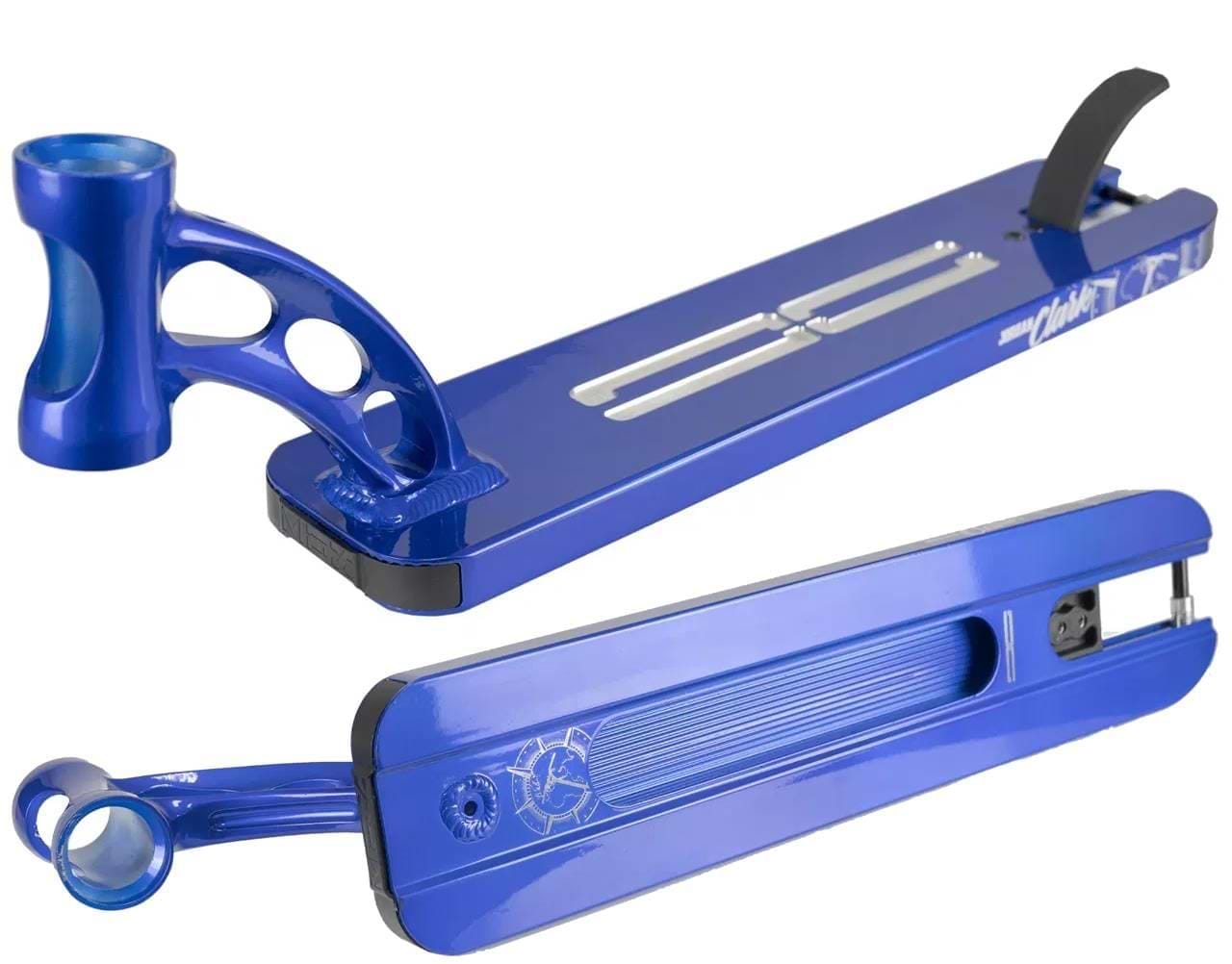
madd gear decks Madd Gear MGP VX9 Blue Jordan Clark Signature Stunt Scooter Deck

Sale price$21.58 Regular price$23.98
Save 10%

Pay in installments of $6.00 with ShopPay, AfterPay and Klarna

Shipping Estimate
USA
  • USA
  • CAN

Ships within 48 hours · Estimated delivery Oct 15 - Oct 20

Promo Codes Available:

For Your Every Summer RSVP, with Code: SUMMER15

Description

madd gear decks Madd Gear MGP VX9 Blue Jordan Clark Signature Stunt Scooter DeckIf you know MGP, then you know that they don't just hand out signature parts willy nilly and this is no exception! 3 x World Champion Jordan Clark has earned himself his Limited Edition MGP Signature Deck through hard work and determination. Jordan is known worldwide as one of the best scooter riders on the planet and has been developing his LE Signature MGP Deck since late 2018 to make sure it's exactly how he wants it to be. He is now happy with how

If you know MGP, then you know that they don't just hand out signature parts willy-nilly and this is no exception! 3 x World Champion Jordan Clark has earned himself his Limited Edition MGP Signature Deck through hard work and determination.

Jordan is known worldwide as one of the best scooter riders on the planet and has been developing his LE Signature MGP Deck since late 2018 to make sure it's exactly how he wants it to be. He is now happy with how the deck rides and how it looks and is ready for other people to get one of their own to see how good it really is.

Everything about Jordan's LE Sig Deck has been tailored to his requirements from the size and the graphics, to the sparkling blue finish and the signature "JC" logo that's CNC'd onto the footplate.

Jordan Says: "Yo guys Jordan Clark here! I hope you like the look of my new sig deck because I’m telling you now it rides even better. This deck is by far the lightest and strongest deck I’ve ever ridden in my scooter career and also the most comfortable for all riding needs! Keep shredding!!!!"

Shipping Notes
  • Free Standard Shipping on $100+ Orders to the USA.
  • Except Preorder products are shipped in 48 hours.
  • Delivery to the USA:
  1. Standard Shipping : 3-10 business days
  • If time is of the essence, please consider selecting expedited delivery for faster service.
Exchange/Return Notes
  • We offer a 30-day return/exchange service after receiving.
  • Final sale items are not eligible for returns or exchanges.
  • To process your return/exchange, please contact us at [email protected]
  • Please click here for more details>>> Return & Exchange Policy
SKU: 19368799549

Discover Niche Categories That Outsell madd gear decks

Top-Converting Item to Boost Your Average Order

4.5 ★★★★★
Based on 9 reviews
Sort
Highest Rating
Newest First
Oldest First
Product Reviews
G
Verified Purchase
Gerdriana Gotopo
Battle Creek, US
★★★★★ 5
Tinta de sublimation
Encantada. El color queda impreso hermoso
WAS THIS REVIEW HELPFUL?YesReportShare
Reviewed in the United States on November 20, 2025
D
Verified Purchase
Deann montague
Pawtucket, US
★★★★★ 4
Missing a black in the box but my favorite ink!
One of my boxes was missing a black but otherwise my favorite ink of all time!
WAS THIS REVIEW HELPFUL?YesReportShare
Reviewed in the United States on November 11, 2025
K
Verified Purchase
Kimmy Gamboa
Los Angeles, US
★★★★★ 5
Tinta para sublimar
Excelente me salió
WAS THIS REVIEW HELPFUL?YesReportShare
Reviewed in the United States on November 2, 2025
S
Verified Purchase
SGT_Clinton
Carnegie, US
★★★★★ 5
Great color saturation
I have only used this a couple of times and was concerned about the dull colors when it printed out. But the listing warns you about that so I went ahead and pressed it. Perfect! Bold colors and high quality images. Plus, filling my printer only took a little over half the bottles. Great value for the money and I will definitely be ordering again.
WAS THIS REVIEW HELPFUL?YesReportShare
Reviewed in the United States on December 28, 2020
L
Verified Purchase
Lourdes L.
Bozeman, US
★★★★★ 5
Superior Customer Service; 100% prefect and functional, BUT...
Number of Items: 2
This product fits perfectly, after all it's just a simple piece replacement. The big deal is the counter reset, and this is where Customer Service outstands. People complaints about the difficulty of following the reset instructions, and with reason, as they are lengthy. But that is the printer you have, that is Epson's product. You either send the printer to them and pay the premium fee, or do it yourself, but you have to play their game. This is not Seller's fault; on the contrary, Seller put all their effort to include each and every steps you need to fix the problem, no matter what printer model you have. They included most, If not all, printer models you may have. They provided super detailed instructions to ensure your success; keys where needed, no keys where not needed, printer drivers location to download and ensure the resetter will work and, best of all, support if you need it. You have to contact them through Amazon asking for the user's manual (instructions; yes, the lengthy ones), the reset program and the reset keys if applicable (this depends on you printer model; some need the reset keys, some do not). And this is where you get concerned: When are they going to answer, now that my printer is locked? You think (I did): it is weekend, they will probably answer Monday or maybe Tuesday (after all, that already have the money, why care?). Well, I was absolutely wrong, they answered during the weekend with all necessary to have the printer back, up and running; Thank You. Some tips: 1. There is nothing wrong with the software (if got from a reputable source, and they for sure are), so get it without concerns. 2. Get the printer driver as advised; it is quite probable that the software will not work if you don't install the correct driver; don't forget to restart the computer after the driver installation. 3. Make sure your printer is set up with the USB connection Enabled (mine was disabled and that caused a headache: ET-4800). 4. When the resetter instructions call for Initialize the Counters, don't do it, not yet; select Check instead, just above Initialize. If you cannot read (Check) the counters, you will not be able to Initialize them: fix the connection problem first (make sure you installed the printer driver and RESTART the computer, make sure you enabled the USB connection in the printer, and make sure the usb cable is correctly connected). It's not Seller's fault to make long and complicated instructions, that is actually their effort to make sure you have all you need to succeed. Buy with confidence, this works: if you cannot make it work, you may find someone you trust to help you out (your kids or grandkids know a lot for sure), or just let Seller know, they are willing to help you out. Best regards.
WAS THIS REVIEW HELPFUL?YesReportShare
Reviewed in the United States on November 10, 2025

recommand products