Pay in installments of $6.59 with
 ,
,
 and
and

Shipping Estimate
USA
- USA
- CAN
- USA
- CAN
Ships within 48 hours · Estimated delivery Sep 19 - Sep 24
 Promo Codes Available:
For Your Every Summer RSVP, with Code: SUMMER15
Description
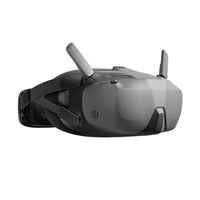
dji fpv goggles hdmi input FPV DJI Goggles N3 for DJI Neo / Avata 2 / O4 Air Drone – DJI HasselbladWhen paired with DJI Neo DJI Avata 2 and DJI RC Motion 3, DJI Goggles N3 lets you soar through the skies and enjoy an immersive flight experience, as if you were in the pilot seat. Activate the head tracking function to control Neo Avata 2 with head or wrist movements, achieving seamless synergy between you and your drone. Easily unlock the aerial acrobatics of Neo, and let Goggles N3 immerse you in the thrilling experience of 360 front back flips,
When paired with DJI Neo/DJI Avata 2 and DJI RC Motion 3, DJI Goggles N3 lets you soar through the skies and enjoy an immersive flight experience, as if you were in the pilot seat. Activate the head tracking function to control Neo/Avata 2 with head or wrist movements, achieving seamless synergy between you and your drone.
Easily unlock the aerial acrobatics of Neo, and let Goggles N3 immerse you in the thrilling experience of 360° front/back flips, left/right rolls, and 180° drifts.
Unlock the Easy ACRO feature - Power Loop with Avata 2 with a single push (no need for advanced Manual mode controls with the DJI FPV Remote Controller series), and experience adrenaline-pumping excitement with DJI Goggles N3.
Compatible Models
- DJI Neo
- DJI Avata 2
Roomy and Eyewear-Friendly Design
The roomy interior comfortably accommodates glasses, without needing diopter adjustments or lens installations. Simply put them on, and you can take off right away.
Integrated Design
The integrated headband and battery design balance the overall weight of the goggles, ensuring no pressure on your face for a comfortable fit.
One-Tap Defogging
When fog builds up on the surface of the lenses, the defogging function effectively controls moisture by accelerating the internal fan speed to swiftly circulate air, making it ideal for changing temperatures and high-humidity conditions.
1080p Ultra-Wide Screen
DJI Goggles N3 has a full 1080p 60Hz LCD screen and an impressive 54° FOV. Enjoy stunning visuals with minimal dizziness as impactful aerial scenes come alive before your eyes.
Ultra-Low Latency, Stable Video Transmission
The advanced DJI O4 digital video transmission system adopts a 2T4R antenna design, offering exceptional anti-interference performance. Enjoy 1080p/60fps live feeds with a minimum latency of 31 ms and a transmission range of up to 13 km. The goggles automatically select the optimal frequency band between 2.4 GHz and 5.8 GHz based on the environment. This ensures stable transmission so you can experience flying in real-time and get a buttery-smooth live view.
With a max video transmission bitrate of 60 Mbps and SyncSmooth technology, video transmission from the skies to the ground is optimised, providing a smooth live view even when flying at a high speed.
AR Cursor
DJI RC Motion 3 can be used as an AR cursor before the aircraft takes off, or when the aircraft is braking or hovering. This allows you to effortlessly activate functions and adjust settings without taking your hands off RC Motion 3.
Real-Time Live Feed Sharing
Connect DJI Goggles N3 to your smartphone using a USB-C cable, and you can display a secondary live feed through the DJI Fly app. This allows others to check the live view in real-time, making sharing and teaching convenient and efficient.
Panorama Video Playback
Import panoramic videos onto a microSD card, and you can watch them through DJI Goggles N3. Enjoy a cinematic viewing experience in everyday life.
2.7-Hour Operating Time
A fully charged DJI Goggles N3 can last through the use of up to 13 DJI Neo batteries. With a powerful 2.7-hour operating time, you can unleash your creative passion and potential to the fullest.
Shipping Notes
- Free Standard Shipping on $100+ Orders to the USA.
- Except Preorder products are shipped in 48 hours.
- Delivery to the USA:
- Standard Shipping : 3-10 business days
- If time is of the essence, please consider selecting expedited delivery for faster service.
Exchange/Return Notes
- We offer a 30-day return/exchange service after receiving.
- Final sale items are not eligible for returns or exchanges.
- To process your return/exchange, please contact us at [email protected]
- Please click here for more details>>> Return & Exchange Policy